Introduction
I built a mini Tesla coil from a small solder-it-yourself kit that cost me about €10, and it is one of the most fun electronics builds I have done so far. When it is powered, the coil makes a high-frequency field strong enough to light a neon bulb or a fluorescent tube that is not connected to anything.
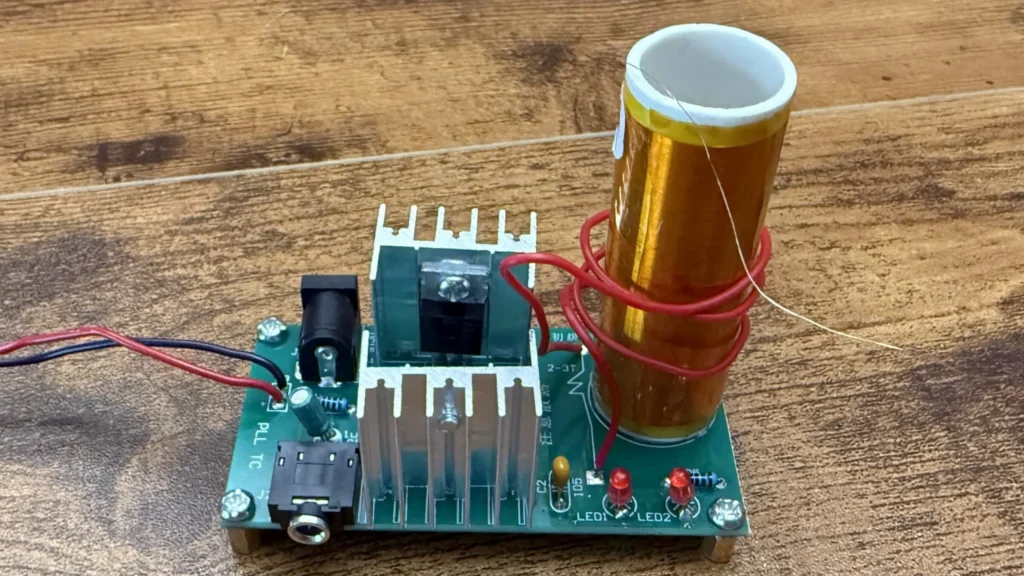
The kit is a mini "music" Tesla coil (the board is marked PLL TC, ZY-TSL18). It runs from 15–24 V DC, uses an IRF530 MOSFET and a TIP41 transistor, and has a 3.5 mm audio input, so you can feed it music from a phone and hear it come out of the arc.
The manual was only in Chinese, so I translated the parts list and the assembly notes and put everything you need below. If this is your first time soldering, my Arduino LED tutorial is a gentle warm-up before you start.
A quick word on safety: the coil produces high-frequency, high-voltage energy. It will not give you a dangerous shock, but the arc at the top can burn your skin, and the field can upset phones and laptops nearby. Always disconnect the power before you touch the board.
 Watch the full build on YouTube
Full build · 15:30
Watch the full build
Every step, the mistakes and the first test, in one video.
Tools and materials
01 Tools
- Soldering iron (a fine tip makes the small joints easier)
- Helping hands or a PCB holder
- Side cutters for trimming the component legs
- Small Phillips screwdriver for the M3 screws
- Wire stripper
- Craft knife or fine sandpaper to scrape the enamel off the coil wire
- Hot glue gun
- Multimeter for checking the resistors and the supply
- Adjustable bench power supply (I ran it at about 24 V)
02 Materials
- Mini music Tesla coil kit (PCB ZY-TSL18 / PLL TC)
- R1, R4: 10 kΩ resistors (2)
- R3, R5: 2 kΩ resistors (2)
- LED1, LED2: 3 mm red LEDs (2)
- C1: 1 µF electrolytic capacitor
- C2: 105 (1 µF) ceramic capacitor
- Q1: IRF530 MOSFET
- Q2: TIP41 NPN transistor
- L2: secondary coil, 350 turns of 0.12 mm enamelled wire
- L1: primary coil, 2–3 turns of thick single-core wire (the red wire in the kit)
- J1: 5.5 × 2.1 mm DC power jack
- J2: 3.5 mm audio jack (3F07)
- Aluminium heatsinks, 25 × 23 mm (2)
- M3 × 10 brass standoffs (4) and M3 × 6 screws (6)
- Small neon bulb (included in the kit for testing)
03 Consumables
- Solder
- Hot glue (or another glue) to hold the secondary coil
- Heat-shrink tubing for the power leads
Build process
-
Step 1: Unpack the kit and check every part
Before I heated up the iron, I laid everything out and checked it against the parts list. The kit is small: the PCB, the pre-wound secondary coil, the two transistors, two heatsinks, the DC and audio jacks, a handful of resistors, capacitors and LEDs, and a tiny neon bulb for testing.
The IRF530 and the TIP41 look almost the same, so read the printing on them and keep them apart. Q1 is the IRF530 and Q2 is the TIP41.
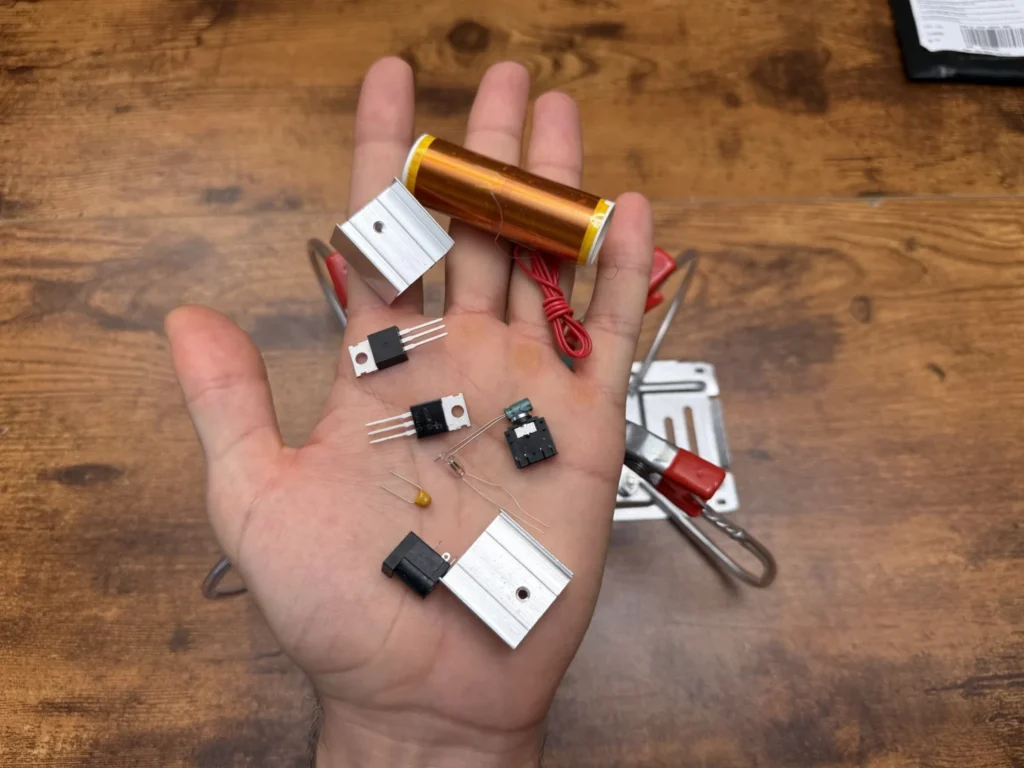
Fig. 01 -
Step 2: Translate the manual and the parts list
The manual was in Chinese, so I went through it line by line. The parts list on the first page tells you exactly which value goes where: the 10 kΩ resistors go in R1 and R4, the 2 kΩ resistors in R3 and R5, the 1 µF electrolytic in C1 and the 105 ceramic in C2.
The other side has the schematic and a short explanation of how the circuit works. It is a resonant circuit that locks onto the frequency of the secondary coil. LED2 is the power indicator, and LED1 is a clamp diode that lights up brightly if the TIP41 is damaged, which is a handy built-in fault check.
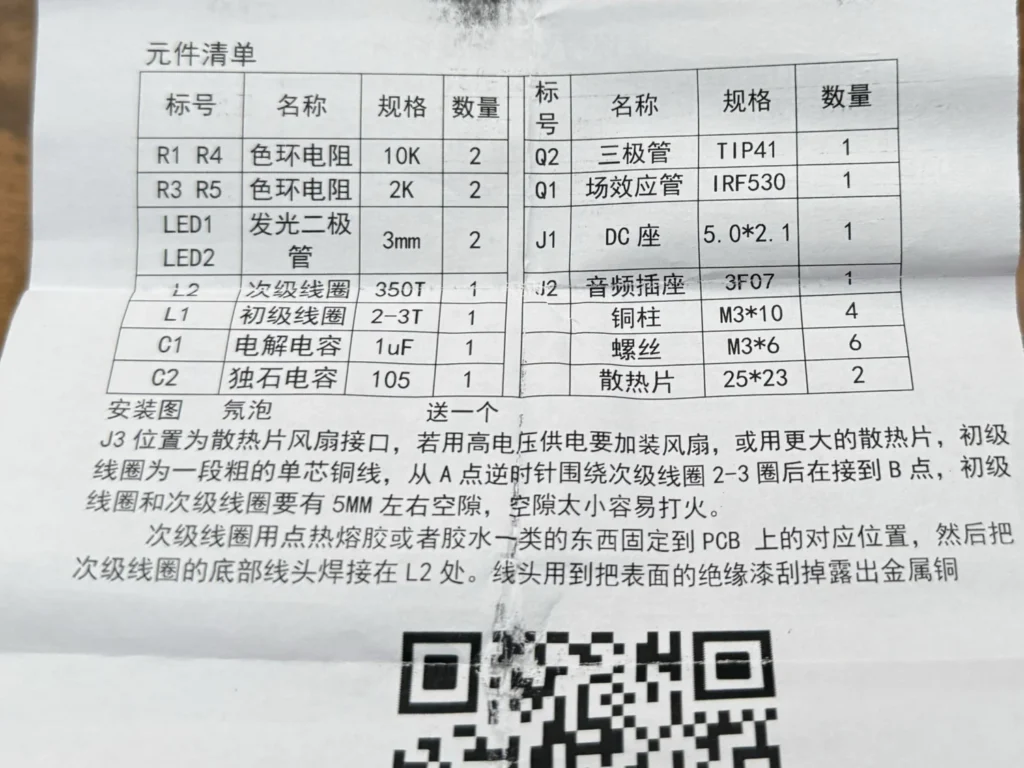
Fig. 02 Kit specs
Input 15–24 V DC (the manual says 9–30 V works), DC jack 5.5 × 2.1 mm, secondary 350 turns of 0.12 mm wire, primary 2–3 turns.
-
Step 3: Solder the resistors and LEDs
I clamped the board in my helping hands and started with the lowest parts, the four resistors. Resistors have no polarity, but check the colour bands or measure them with a multimeter so the 10 kΩ and 2 kΩ values end up in the right spots.
Then I fitted the two 3 mm LEDs. These do have polarity: the longer leg is positive. A reversed LED is one of the most common mistakes with this kit, according to the manual, so double-check them before soldering. I trimmed all the legs short after soldering.
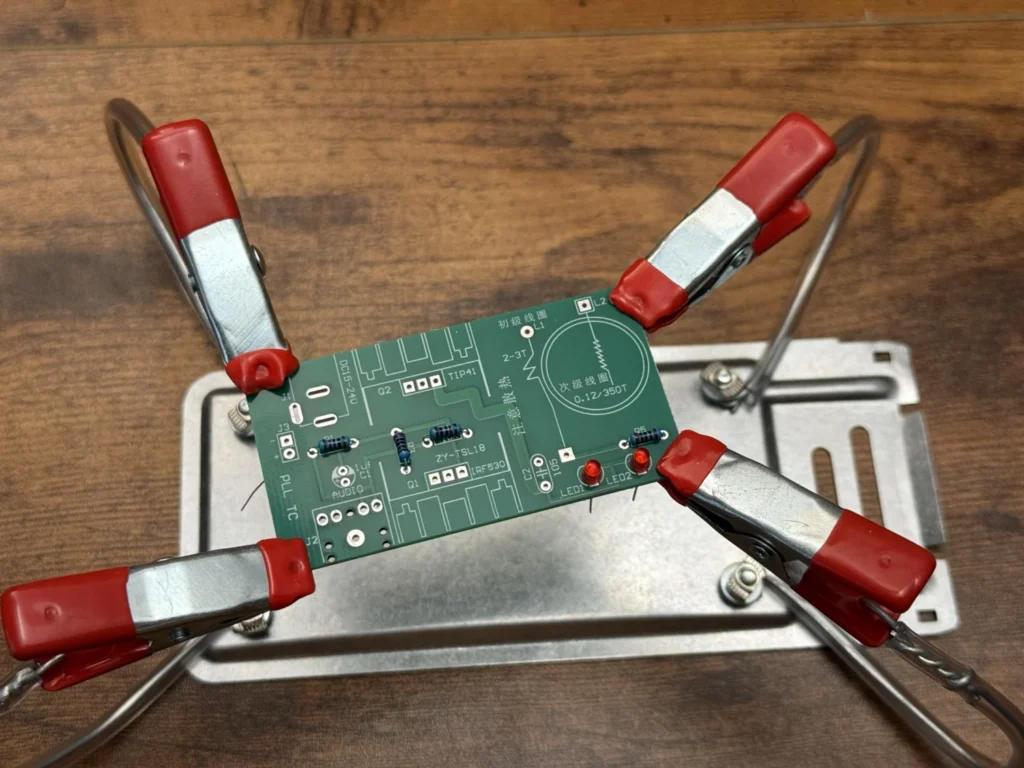
Fig. 03 Watch the polarity
The LEDs and the C1 electrolytic capacitor only work one way round. Match the long leg to the + mark on the silkscreen.
-
Step 4: Fit the capacitors and the jacks
Next came C1 (the 1 µF electrolytic, again with the + leg in the + hole) and C2 (the small yellow 105 ceramic, which can go either way).
Then I soldered in the DC power jack (J1) and the 3.5 mm audio jack (J2). These have thick legs and need a bit more heat, so hold the iron on a little longer and make sure the solder flows all the way round the pad. I also soldered my power leads to the J3 pads. J3 is meant as a fan connector for the heatsinks, but on this board it sits on the supply, so it works as a handy spot for bare power leads from a bench supply.
-
Step 5: Mount the transistors on the heatsinks
The IRF530 (Q1) and TIP41 (Q2) each get their own aluminium heatsink. I screwed each transistor to its heatsink with an M3 screw first, then pushed the legs through the board and soldered them. Doing it in that order keeps the transistor flat against the heatsink.
The silkscreen next to the transistors says "pay attention to heat dissipation" in Chinese, and it means it: at 24 V these get warm quickly.
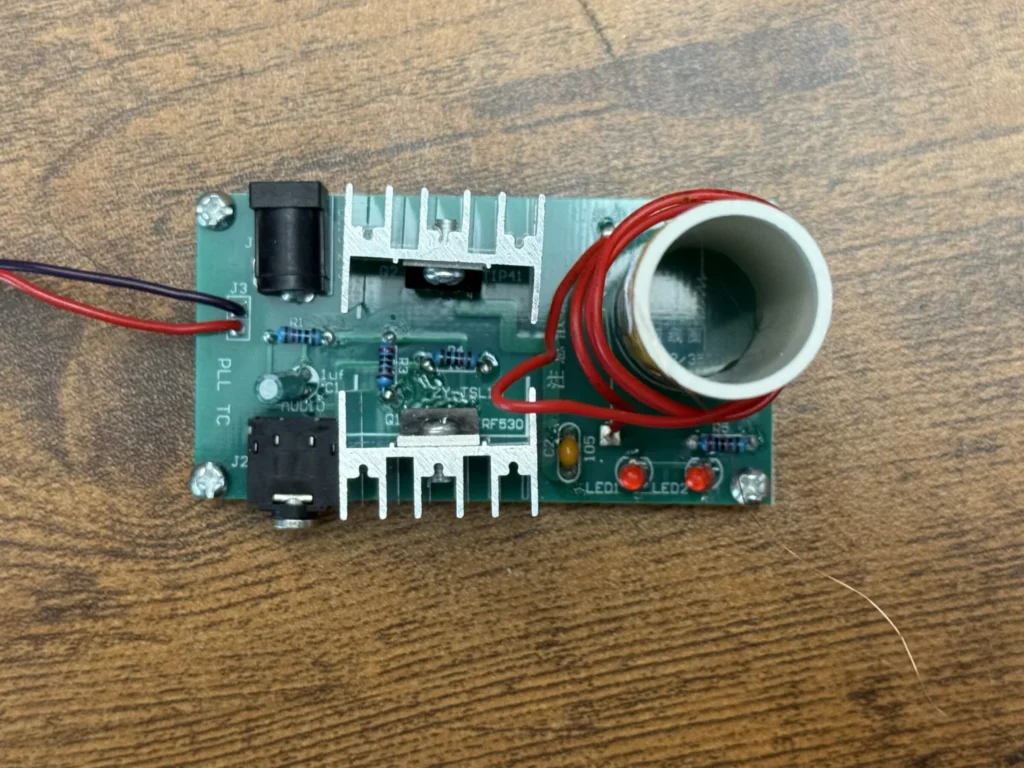
Fig. 04 -
Step 6: Add the standoffs
I screwed the four M3 × 10 brass standoffs into the corners with the M3 × 6 screws. They lift the board off the desk, so the solder joints underneath don't touch anything and air can move around the heatsinks.
-
Step 7: Glue down the secondary coil and solder L2
The secondary coil is the tall tube wrapped in 350 turns of very thin copper wire. I glued it onto the circle printed on the PCB with hot glue.
The bottom wire of the coil gets soldered to the L2 pad. The wire is enamelled, so solder won't stick to it until you scrape the insulation off. I gently scraped the end with a knife until I could see bright copper, then soldered it. The top wire stays free; that is where the energy comes out.
Heads up
The secondary wire is extremely thin. Scrape gently and don’t pull on it, or it will snap right at the coil.
-
Step 8: Wind the primary coil
The primary is just a length of thick single-core wire (the red wire in the kit). Starting at point A, I wound it counter-clockwise 2–3 turns around the secondary and soldered the other end to point B.
Two things matter here. The direction of the winding has to be right, otherwise the circuit won't oscillate; that is the most common problem with this kit. And leave a gap of about 5 mm between the primary and the secondary. If the gap is too small, it sparks across.
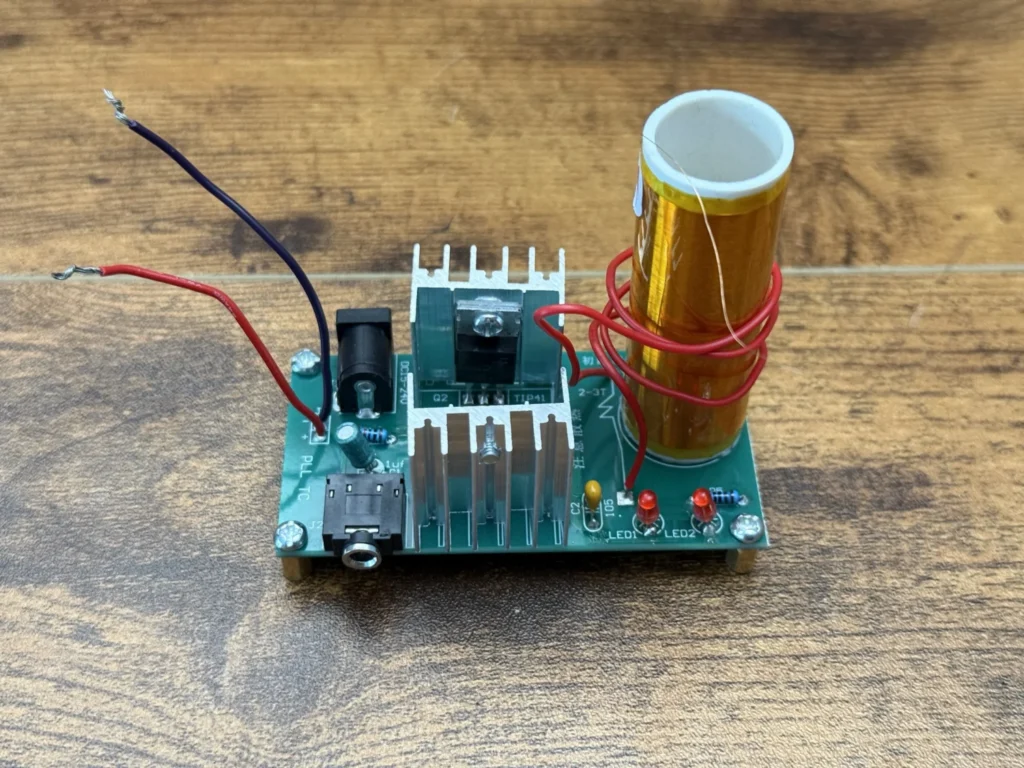
Fig. 05 Primary coil
2–3 turns, counter-clockwise from A to B, with about a 5 mm gap to the secondary.
-
Step 9: Power it up and test it wirelessly
I connected the leads to my bench power supply and slowly brought it up to about 24 V. LED2 lit up to show power. Then I held the little neon bulb above the coil, and it started glowing orange without touching anything.
Next I tried a fluorescent tube. Just holding it near the coil made it light up bright white. That is the moment that makes this build worth it.
The board also has the 3.5 mm audio input. Plug in a phone or an MP3 player and the arc changes with the music, so the coil works as a tiny plasma speaker. The higher the voltage, the longer the arc and the louder the sound.
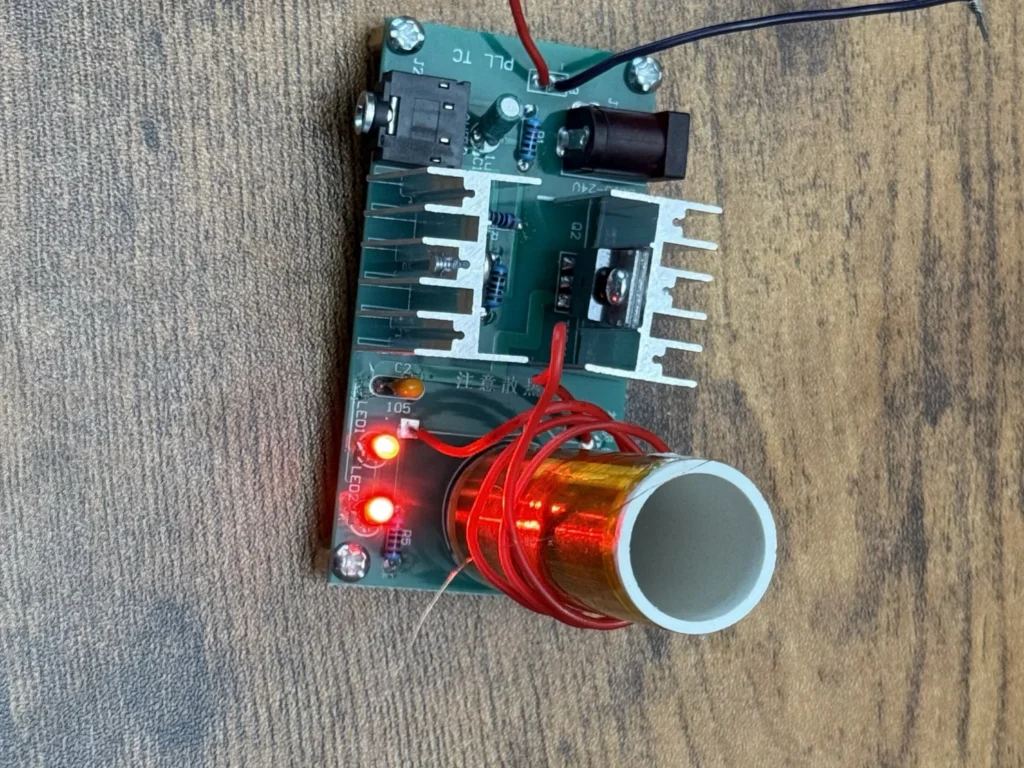
Fig. 06 Safety
Don’t touch the top of the coil while it is running; the arc can burn you. Keep phones, laptops and other electronics away from the coil, and disconnect the power before adjusting anything.
Problems & mistakes
This kit has a high success rate, but a few things can stop it working. If nothing happens when you power it up, check the direction of the primary winding first, then the polarity of the LEDs and C1.
If the arc is weak or the sound is quiet, the voltage is too low or the power supply can't deliver enough current. A proper bench supply or a 24 V adapter that can give about 2 A works much better than a weak wall plug.
If LED1 suddenly lights up bright, the TIP41 has probably failed and needs replacing.
The heatsinks get warm fast at 24 V. Don't leave the coil running for long periods, or add a fan.
Most common mistake
Winding the primary coil the wrong way round. If the coil does nothing, unsolder one end and wind it in the opposite direction.
Final result
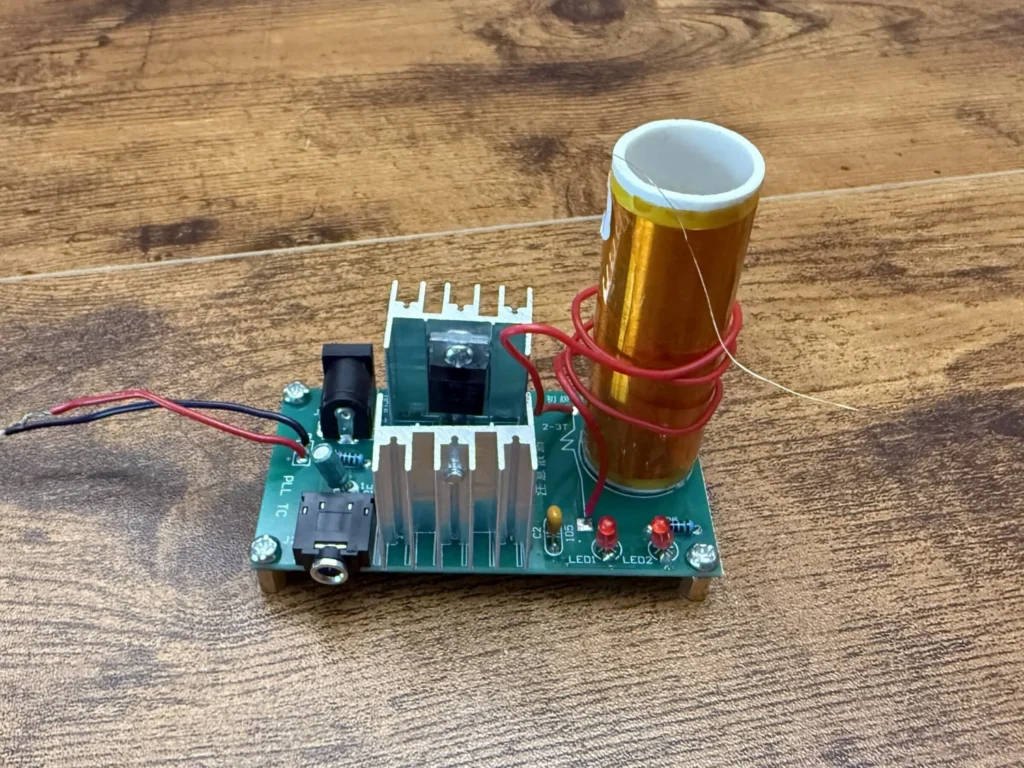
The finished mini Tesla coil works exactly as I hoped. At about 24 V it lights the neon bulb and a fluorescent tube held close to the coil, with no wires at all, and the audio input turns it into a little plasma speaker.
For about €10 and two hours of soldering, it is a great way to see wireless power in action and to learn how a resonant circuit works. You can watch the whole build and the tests in the video.
What I would change
I would add a small fan on the J3 connector, rated for the supply voltage (J3 carries the full input voltage), or use bigger heatsinks, so the coil can run longer at 24 V without the transistors getting hot.
I would build a simple enclosure or a clear cover around the board so nobody touches the electronics by accident, and leave just the coil sticking out.